
Reading Time: 14 minutes
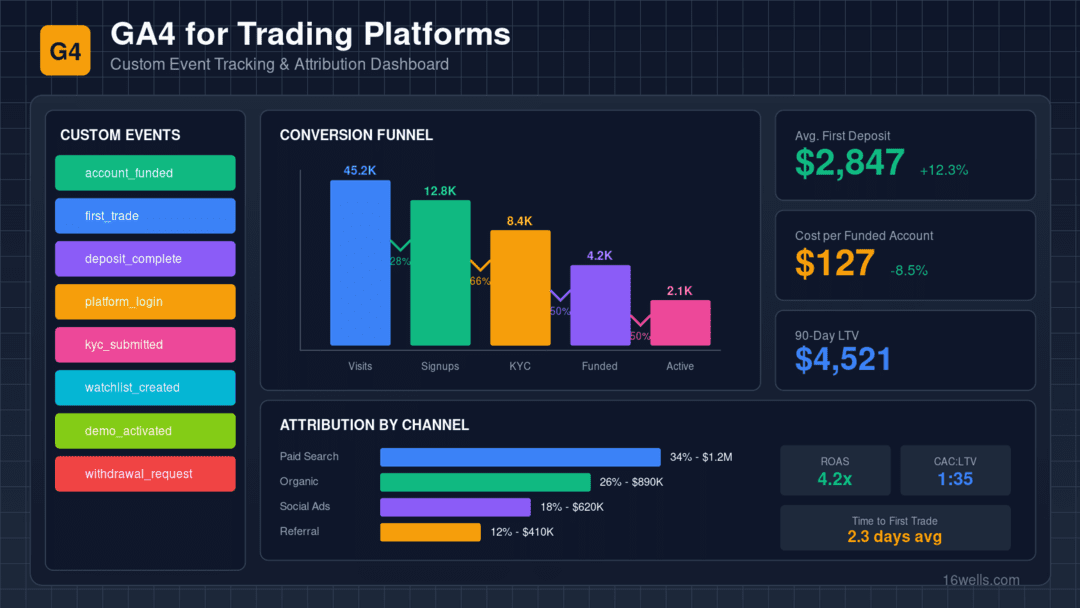
Example of custom event tracking and attribution (all numbers example only)
Your GA4 Implementation Is Probably Broken
When Universal Analytics finally sunset, most businesses scrambled to migrate to Google Analytics 4. IT teams and developers did their best with GA4’s new event-based model, but the uncomfortable truth is that generic GA4 implementations miss most of what matters for financial services and SaaS marketing.
The problem isn’t technical competence—it’s domain knowledge. GA4 out of the box is designed for e-commerce: add to cart, checkout, purchase. Financial services firms, SaaS companies, and B2B businesses don’t work that way. The journey from anonymous visitor to paying, engaged customer is longer, more complex, and involves stages that standard GA4 events simply don’t capture.
When we audit GA4 implementations for data-driven businesses, we typically find the same problems: free trials treated the same as paid conversions, no visibility into deal values or product usage, trial users and paying customers conflated, multi-session journeys broken by cookie expiration, and critical events either missing entirely or mis-named in ways that break analysis.
These aren’t minor issues. They fundamentally compromise your ability to understand what’s working in your marketing and where to invest.
Building a Data-Driven Business Event Taxonomy
GA4’s event-based model is actually well-suited to complex B2B funnels—if you design the right events. Here’s the framework we use:
Tier 1: Acquisition Events
These events track the early stages of the funnel, before any account creation.
lead_form_start fires when someone begins filling out a lead capture form. This matters because form abandonment rates tell you about landing page and form optimization opportunities.
lead_form_complete fires on successful form submission. Parameters should include form_name, source_page, and any qualifying information collected.
content_engagement tracks meaningful interaction with educational content—watching videos, downloading guides, completing courses. Parameters should include content_type, content_id, and engagement_depth (like video percentage watched).
Tier 2: Trial/Free Account Events
Free trials and freemium accounts are critical for many businesses but require careful tracking separate from paid conversions.
trial_start fires when someone begins the free trial registration process.
trial_complete fires on successful trial account creation. Parameters should include account_type (trial tier, plan type, etc.) and initial_access_level.
trial_action tracks actual usage of the trial product. Parameters should include feature_type, action_type (view, create, etc.), and session_number (first action, repeat usage).
trial_milestone tracks progression within the trial experience—completing tutorials, reaching usage thresholds, achieving key outcomes.
Tier 3: Conversion Events
These are your actual business outcomes—paying customers with real money.
purchase_initiated fires when someone starts the payment process. Parameters should include payment_method and intended_plan.
purchase_complete fires when payment is confirmed. This is your primary conversion event. Parameters should include purchase_amount, payment_method, and plan_type. Mark this as a key event in GA4.
first_paid_action fires when a paid customer completes their first key action. This secondary conversion often matters more than purchase itself for LTV prediction.
Tier 4: Retention Events
These events track ongoing engagement and help predict churn.
product_action tracks ongoing product usage. Parameters should include feature_type, action_value_range, and session_action_count.
upgrade_complete tracks plan upgrades after initial purchase.
feature_adoption tracks usage of advanced platform features—integrations, advanced settings, mobile app login.
support_contact tracks support interactions, which are often leading indicators of either satisfaction or churn.
The Five Most Common GA4 Implementation Mistakes
Mistake 1: No Distinction Between Trial and Paid
This is the most damaging mistake. When “account_created” is your conversion event and it fires for both free trials and paid accounts, your conversion data is meaningless. Worse, advertising platforms optimize toward this combined signal, bringing you more trial signups (which are easy to get) rather than paying customers (which are hard).
The fix: Create separate events for trial_complete and purchase_complete. Never use a generic “signup” or “account_created” event for both.
Mistake 2: Missing Purchase/Deal Value Data
A customer who signs up for a $29/month plan is not the same as a customer who commits to a $500/month enterprise contract. If your GA4 implementation doesn’t capture purchase values, you can’t optimize toward higher-value customers, and your LTV calculations are impossible.
The fix: Pass purchase_amount as a parameter on your purchase_complete event. Use the value parameter for conversion value in GA4 and Google Ads.
Mistake 3: Client-Side Only Implementation
Many businesses have payment processing happen through secure, server-side processes that client-side JavaScript can’t easily track. If your paid conversions happen in a secure iframe, through a third-party processor, or in a separate application, client-side GA4 tags may never fire.
The fix: Implement server-side GA4 tracking via the Measurement Protocol. When a paid conversion event occurs on your backend, send it directly to GA4 along with any client ID or user ID needed for attribution.
Mistake 4: Cookie Expiration Breaking Attribution
The journey from first touch to paid customer often takes weeks or months. GA4 cookies expire, browsers clear cookies, and users switch devices. If you’re not actively managing identity, you lose attribution for a significant portion of your conversions.
The fix: Implement user ID tracking that persists across sessions. When users authenticate (even for free trials), pass a consistent user_id to GA4. This allows Google to connect anonymous pre-login behavior with authenticated post-login behavior.
Mistake 5: No Offline Conversion Integration
For many B2B businesses, the “conversion” happens outside the web session—when sales closes the deal, when the contract is signed, when the first invoice is paid. If this data isn’t flowing back to GA4, you’re measuring the wrong thing.
The fix: Build offline conversion import pipelines that push conversion data from your backend systems to GA4 (and to advertising platforms) with appropriate timestamps and attribution data.
Server-Side GA4: Why It Matters for Financial Services
We’ve covered server-side tracking in other articles, but it deserves specific attention in the GA4 context. Here’s why it’s particularly important for financial services firms and data-driven businesses:
Secure event transmission allows you to track events that happen in secure contexts (payment flows, compliance processes) without compromising security by exposing tracking code in those environments.
Data enrichment lets you add backend data to your events before they reach GA4. When someone becomes a customer, you can include not just the purchase amount but their predicted LTV based on similar accounts, their qualification status, their product usage history from trial—data that would be impossible to access client-side.
Reliability improves because server-side events don’t depend on the user’s browser successfully executing JavaScript. For high-value conversion events like paid signups, this reliability matters.
Privacy compliance becomes easier to manage when all data flows through your server. You can implement consent checks, data filtering, and audit logging in one place rather than scattered across client-side tags.
Custom Dimensions and Reports for Data-Driven Businesses
GA4’s custom reports are powerful but require setup. Here are the custom dimensions you should create:
User-scoped dimensions capture attributes that persist across sessions: account_type (trial, paid, enterprise), highest_plan_value, customer_tier (based on activity levels), acquisition_source (detailed beyond default attribution).
Event-scoped dimensions capture attributes of specific events: feature_type, action_value_range, content_category, payment_method.
With these dimensions, you can build reports that answer the questions that actually matter: What’s the trial-to-paid conversion rate by acquisition source? What’s the average time from trial creation to paid conversion? Which content types correlate with higher deal values? Which features do our highest-value customers use most?
Integration with Advertising Platforms
GA4 is the foundation, but the real value comes from how it integrates with your advertising.
Google Ads integration should import your key events as conversions. Configure paid conversions as your primary conversion action, with appropriate conversion value based on purchase amount. Use data-driven attribution for more accurate credit assignment across touchpoints.
Enhanced conversions pass first-party data (hashed email, phone) to Google to improve conversion measurement across devices and sessions. This is particularly important for the long consideration journeys typical in B2B and financial services acquisition.
Offline conversion import pushes conversion data back to Google Ads with click IDs (GCLIDs), allowing Google to optimize toward users who actually convert—not just users who visit your landing page.
Audience building uses your GA4 data to create targeted audiences: trial users who haven’t converted, paying customers for exclusion or cross-sell, high-value customers for lookalike modeling.
Frequently Asked Questions
How do I track conversions that happen outside my website (like sales-closed deals)?
Use the GA4 Measurement Protocol to send server-side events. When your backend systems confirm a conversion (regardless of how it occurred), fire an event to GA4 with the client ID or user ID that links back to the original web session. This requires some development work but is essential for accurate conversion tracking in B2B businesses.
Should trial signups be marked as conversions?
Trial signups should be tracked as events but not marked as key conversions for optimization purposes. Track them as trial_complete so you can analyze the funnel, but configure your advertising platforms to optimize toward purchase_complete events. Otherwise, their algorithms will optimize for the easier goal (trials) rather than the valuable goal (paying customers).
How do I handle users who start trials and later convert to paid?
Use consistent user ID tracking. When someone creates a trial account, assign them a user ID in GA4. When they later purchase, use the same user ID. GA4 will connect these events, allowing you to analyze the trial-to-paid journey and attribute the conversion back to the original acquisition source.
What’s the difference between GA4 and Google Tag Manager Server-Side?
GA4 is the analytics platform where your data lives and gets analyzed. Google Tag Manager Server-Side is the infrastructure for collecting and routing that data. GTM Server-Side acts as an intermediary—your website sends data to your GTM server, which processes it and forwards to GA4 (and other platforms). For data-driven businesses, using both together provides the most robust tracking.
How do I track product usage without violating user privacy?
Track aggregate patterns rather than specific activities. Instead of tracking “User X viewed account number 12345,” track “product_action with feature_type: account_view, action_value_range: standard.” This gives you the marketing intelligence you need without capturing sensitive details.
Why is my GA4 showing different numbers than Google Ads?
This is common and usually stems from different attribution models, conversion window differences, and data sampling. GA4 uses its own attribution model while Google Ads uses its own. Ensure you’re comparing apples to apples—same conversion events, same date ranges, same attribution settings. Some discrepancy is normal; large discrepancies indicate configuration problems.
Key Takeaways
Generic GA4 implementations fail data-driven businesses because they don’t understand the business model. The trial-to-paid journey, the importance of deal values, the long consideration cycles, the server-side conversion events—these all require thoughtful, custom configuration.
Investing in proper GA4 setup pays dividends in better marketing decisions. When you can see which channels drive paying customers (not just visits), which content correlates with higher deal values, and which user patterns predict long-term value, you can allocate marketing budgets with confidence.
The gap between businesses with good GA4 implementations and those without will only widen as third-party data becomes less available. Your first-party analytics data is becoming more valuable every year. Make sure you’re collecting it properly.