
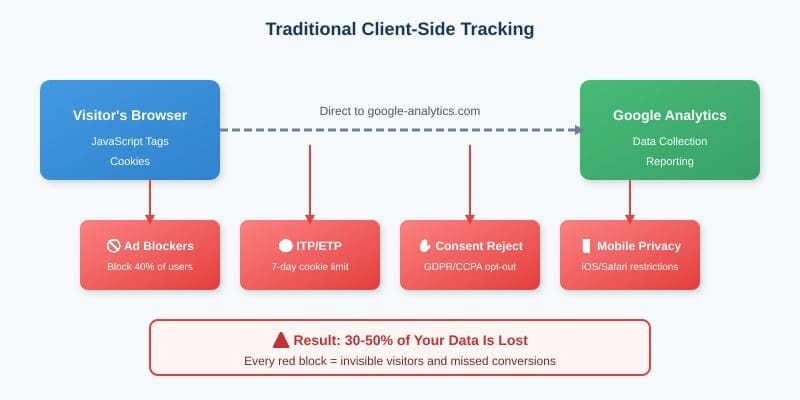
Figure 1: Traditional Client-Side Tracking—Multiple Points of Failure
Your Analytics Data Is Disappearing: Why Server-Side Tracking Is No Longer Optional
How browser privacy changes are making 30-50% of your marketing data vanish—and what smart marketers are doing about it.
Here’s a question that should keep every marketer up at night: What if nearly half of your website visitors are invisible to your analytics?
Not hypothetical. Not some far-off future scenario. This is happening right now, today, on your website. And if you’re still relying entirely on traditional browser-based tracking through Google Analytics, you’re making decisions based on incomplete data—like trying to drive while someone has taped over half your windshield.
The good news? There’s a solution. It’s called server-side tracking, and for businesses serious about data-driven marketing (especially those of us in financial services where every conversion matters), it’s become the difference between guessing and knowing.
Let me show you why this matters and what you can do about it.
The Problem: Why Traditional Tracking Is Failing You
First, let’s understand how traditional Google Analytics tracking has worked for the past two decades. When someone visits your website, a small piece of JavaScript code loads in their browser. That code drops a cookie, watches what the visitor does, and sends that information directly from the browser to Google’s servers.
Simple. Elegant. And increasingly broken.
Here’s what’s happening to that once-reliable system:
Ad Blockers Are Everywhere
Approximately 40% of internet users now run ad blockers, and most of these tools don’t just block ads—they block tracking scripts entirely. That Google Analytics JavaScript tag? Blocked before it even loads. These visitors are completely invisible to your analytics.
Browsers Have Declared War on Cookies
Safari’s Intelligent Tracking Prevention (ITP) limits first-party cookies to 7 days and blocks third-party cookies completely. Firefox has Enhanced Tracking Protection enabled by default. Even Google Chrome—which has dragged its feet for competitive reasons—is implementing restrictions. The result? Your returning visitors look like new visitors. Your attribution windows are shrinking. Your data is fragmenting.
Privacy Regulations Are Tightening
GDPR, CCPA, and their proliferating cousins require explicit consent for tracking. Many users click “reject all” on cookie consent banners—and with client-side tracking, that means you lose them entirely.
Mobile Devices Are a Black Box
iOS 14.5’s App Tracking Transparency didn’t just affect mobile apps—it signaled Apple’s broader commitment to user privacy that extends to Safari’s behavior. Mobile users, who often represent 60%+ of traffic, are increasingly difficult to track through traditional means.
The bottom line: If you’re only using client-side tracking, you’re likely missing 30-50% of your actual traffic and conversions. For a trading platform or financial services company where customer acquisition costs can run into the hundreds of dollars, that’s not just an analytics problem—it’s a business intelligence crisis.
The Solution: How Server-Side Tracking Changes the Game
Server-side tracking flips the traditional model on its head. Instead of relying on the visitor’s browser to collect and send data to Google, your own server handles the heavy lifting.
Here’s the key insight: when data collection happens on your server, it bypasses nearly all of the problems we just discussed.
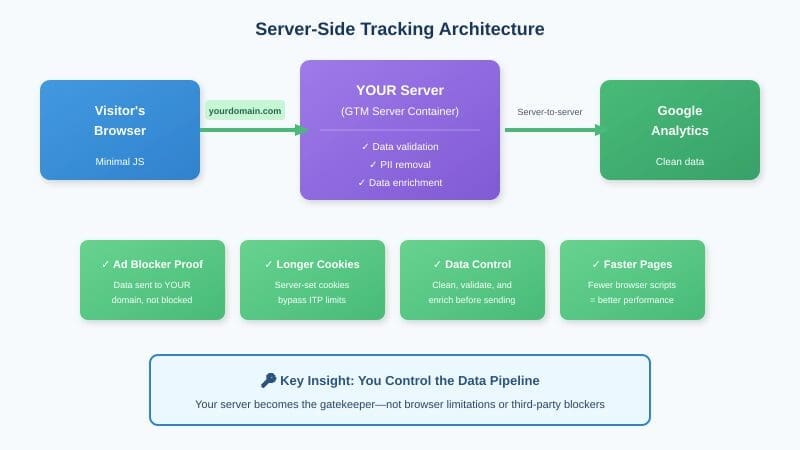
Figure 2: Server-Side Tracking—Your Server Takes Control
With server-side tracking through Google Tag Manager’s Server Container (running on Google Cloud Platform or another cloud provider), the flow looks like this: The visitor’s browser sends data to YOUR server first. Your server then processes, enriches, and forwards that data to Google Analytics (and any other platforms you use). This architecture creates several immediate advantages:
Ad Blockers Can’t Touch It
Because the tracking endpoint is on your domain (yourdomain.com/collect rather than google-analytics.com), ad blockers don’t recognize it as a tracking request. The data flows through normally.
First-Party Cookies Stay Alive Longer
When cookies are set by your server (not by JavaScript in the browser), they’re treated as true first-party cookies. Safari’s ITP restrictions are significantly reduced, and your cookies can maintain their intended expiration dates.
Data Quality Improves Dramatically
Server-side processing lets you validate, clean, and enrich data before it reaches Google Analytics. You can filter out bot traffic more effectively, add customer data from your CRM, and ensure consistency across all your marketing platforms.
Privacy Compliance Gets Easier
With server-side tracking, you control the data pipeline. You can strip out personally identifiable information (PII) before it reaches third-party platforms. You can honor consent choices more reliably. You become the gatekeeper, not the passenger.
Page Speed Improves
Fewer JavaScript tags loading in the browser means faster page loads. For financial services sites where trust and professionalism matter, and where Google’s Core Web Vitals increasingly affect search rankings, this is a meaningful benefit.
The Real-World Impact: What the Numbers Show
Let’s get specific about what implementing server-side tracking typically reveals.
When we help clients implement server-side tracking, we commonly see 20-40% more sessions captured compared to client-side only, 25-50% more conversions attributed to their marketing campaigns, significantly longer cookie lifespans (weeks or months instead of days), and more accurate cross-device user journeys.

Figure 3: Typical Data Recovery After Implementing Server-Side Tracking
For a trading platform or financial services company, think about what this means. If you’re attributing $100,000 in monthly marketing spend based on incomplete data, you might be dramatically undervaluing your best-performing channels while overinvesting in underperformers. That’s not just a measurement problem—it’s a capital allocation problem.
The Honest Trade-Offs
I’d be doing you a disservice if I didn’t acknowledge that server-side tracking isn’t a magic wand. There are real considerations:
Implementation complexity: This isn’t a plug-and-play solution. You need technical resources to set up and maintain a server-side container. For many organizations, this means working with a partner who specializes in this area.
Ongoing costs: Running a server-side container on Google Cloud Platform typically costs $50-200 per month depending on your traffic volume. For most businesses, this is trivial compared to the value of recovered data, but it’s not free.
Not 100% recovery: Server-side tracking improves data capture significantly, but some data loss is inevitable. Users who completely reject all cookies, visitors using extreme privacy tools, and certain scenarios will still result in gaps. The goal is dramatic improvement, not perfection.
Hybrid approach required: Server-side tracking works best alongside (not instead of) client-side tracking. You’ll run both in parallel, with server-side filling the gaps that client-side misses.
Why This Matters Now More Than Ever
Here’s what makes this moment critical: the trends driving data loss are accelerating, not slowing down. Every major browser is tightening privacy controls. Every new privacy regulation adds constraints. Every generation of users is more privacy-aware than the last.
Companies that implement server-side tracking now will build months or years of accurate data while their competitors continue flying partially blind. In an industry like financial services—where marketing efficiency directly impacts profitability and where customer acquisition is increasingly competitive—that data advantage compounds over time.
Simon Sinek often talks about starting with “why”—understanding the deeper purpose behind what we do. The “why” of server-side tracking isn’t really about technology or even data. It’s about making better decisions. It’s about understanding your customers accurately so you can serve them better. It’s about spending your marketing budget wisely so you can invest more in building better products and experiences.
Bad data leads to bad decisions. Better data leads to better decisions. It really is that simple.
What To Do Next
If you’re still relying solely on traditional client-side tracking, you have three options:
Option 1: Do nothing. Continue making decisions based on incomplete data and hope your competitors are doing the same. (They’re probably not.)
Option 2: DIY implementation. If you have strong technical resources in-house, Google’s documentation for server-side Google Tag Manager is comprehensive. Plan for a significant time investment to get it right.
Option 3: Work with specialists. Partner with a team that has implemented server-side tracking across multiple environments and can get you up and running efficiently while avoiding common pitfalls.
Whichever path you choose, the important thing is to recognize that the old way of tracking is no longer sufficient. The question isn’t whether you should implement server-side tracking—it’s how quickly you can make it happen.
Your data is disappearing. But now you know how to get it back.
Frequently Asked Questions
What is server-side tracking for Google Analytics?
Server-side tracking routes analytics data through your own server before sending it to Google Analytics. Instead of the visitor’s browser sending data directly to google-analytics.com (where it can be blocked), the data goes to your domain first, then your server forwards it to Google. This bypasses browser limitations like ad blockers and cookie restrictions that cause significant data loss with traditional client-side tracking.
How much data am I losing with client-side only tracking?
Most businesses lose 30-50% of their analytics data due to a combination of factors: ad blockers (affecting approximately 40% of users), Safari’s Intelligent Tracking Prevention which limits cookies to 7 days, Firefox’s Enhanced Tracking Protection enabled by default, and users clicking “reject all” on GDPR/CCPA consent banners. The exact percentage depends on your audience demographics and traffic sources.
How much does server-side tracking cost?
Running a GTM server container on Google Cloud Platform typically costs $50-200 per month depending on your traffic volume. For most businesses—especially those in financial services where customer acquisition costs run into the hundreds of dollars—this is minimal compared to the value of recovering 20-40% more conversion data and improving marketing attribution accuracy.
Does server-side tracking bypass ad blockers?
Yes. Because server-side tracking sends data to your own domain (yourdomain.com/collect) rather than google-analytics.com, ad blockers don’t recognize it as a tracking request. The data flows through normally because, from the browser’s perspective, it’s just communicating with your website.
Do I need to remove client-side tracking if I implement server-side?
No. Server-side tracking works best as a hybrid approach alongside your existing client-side tracking, not as a replacement. You’ll run both in parallel, with server-side filling the gaps that client-side misses. This gives you the most complete picture of your actual traffic and conversions.
How long does it take to implement server-side tracking?
Implementation time varies based on complexity. A straightforward setup for a single website with standard Google Analytics tracking might take a few days. More complex implementations involving multiple platforms, custom data enrichment, or CRM integrations can take several weeks. Working with a specialist who has done this before significantly reduces both time and troubleshooting.
Want to see how much data you’re missing? At 16wells, we help financial services and data-driven companies implement server-side tracking that recovers lost conversions and provides accurate attribution. Let’s talk about what your analytics might be hiding from you.