
TL;DR: After redesigning over 100 financial services websites, we’ve identified the patterns that separate high-converting sites from the rest. Success comes down to clear value propositions above the fold, trust signals strategically placed throughout the journey, compliance-conscious CTAs that still drive action, and page structures that move visitors from awareness to conversion. This comprehensive checklist covers every element that matters—from homepage structure to feature pages to the signup and onboarding flow.
Reading Time: 15 minutes
Why Most Financial Services Websites Underperform
Financial services firms live and die by their websites. Unlike most businesses where the website supports the product, for fintech, wealth management, insurance, and lending companies, the website IS a major part of the product experience. It’s where prospects research, where they sign up, where they access education, and often where they engage with your services.
Yet most financial services websites make the same mistakes:
- They lead with features when visitors want outcomes
- They bury trust signals that could differentiate them
- They create friction in the signup process
- They fail to segment messaging for different customer types
- They neglect mobile experience despite high mobile research traffic
At 16wells, we’ve redesigned websites for wealth management firms, fintech platforms, insurance companies, lending platforms, and B2B SaaS companies in the financial services space. The checklist that follows represents everything we’ve learned about what actually moves conversion metrics.
Homepage Essentials
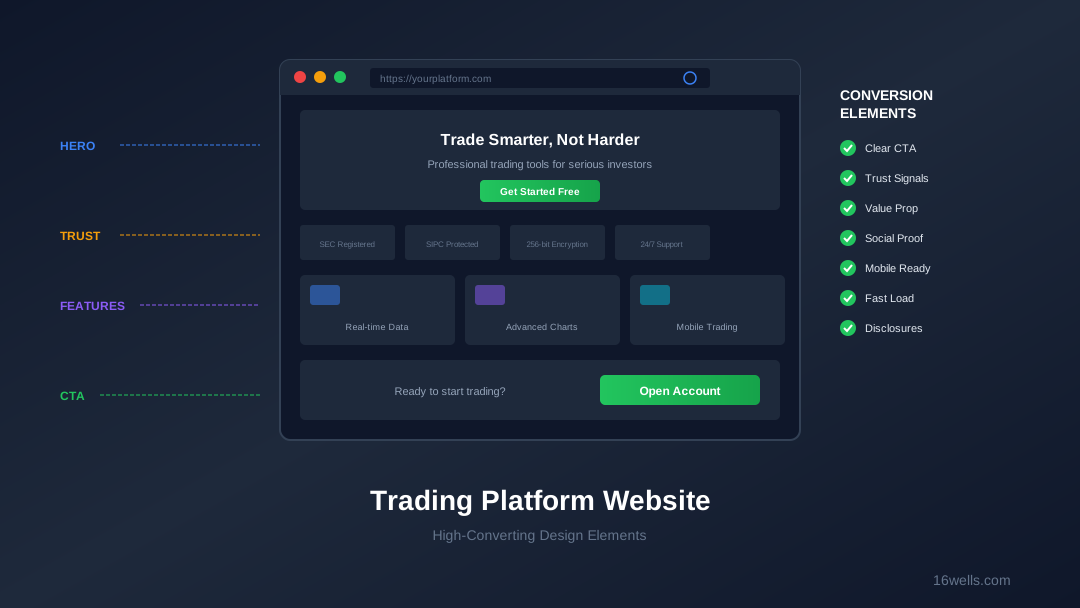
Above the Fold: The First Five Seconds
Your homepage has about five seconds to communicate value and earn continued attention. Above-the-fold content must accomplish specific goals:
Primary headline: Should communicate what you offer and who it’s for. Not a clever tagline—a clear value statement.
- Weak: “Transform Your Future”
- Strong: “Wealth Management Built for Growing Businesses”
Supporting subhead: Expands on the headline with specific benefits or differentiators.
- Weak: “Join thousands of clients”
- Strong: “Professional-grade tools, dedicated advisors, and $0 advisory fees on accounts under $50K”
Primary CTA: One clear call to action that moves visitors toward conversion.
- Weak: “Learn More”
- Strong: “Get Started Free” or “Schedule a Consultation”
Trust indicator: One prominent trust signal visible without scrolling (regulatory status, customer count, years in business).
Visual hierarchy: The eye should move naturally from headline to subhead to CTA. Don’t let competing elements fragment attention.
Below the Fold: Building the Case
As visitors scroll, your homepage should systematically address their questions and concerns:
Section 1: Core Value Props (Features/Benefits)
- 3-4 key differentiators with brief explanations
- Focus on outcomes, not just features
- Include visual elements (icons, screenshots) that reinforce messaging
- Link to detail pages for those wanting more information
Section 2: Platform/Service Showcase
- Screenshots or video of the actual interface or service experience
- Highlight distinctive features visually
- Consider interactive elements that let visitors experience the platform
- Multiple screenshots for different device types if applicable
Section 3: Trust and Credibility
- Regulatory status and memberships prominently displayed
- Customer testimonials with photos and verification when possible
- Press mentions and awards if available
- Customer count or assets under management statistics if impressive
Section 4: Pricing Transparency
- Clear, scannable pricing information
- Comparison with competitors if favorable
- No hidden fees messaging
- Link to comprehensive pricing page
Section 5: Getting Started Path
- Simple 3-4 step explanation of the onboarding process
- Time expectation (“Get started in 10 minutes”)
- What they’ll need to complete the process
- Secondary CTA to begin
Homepage Conversion Checklist
- [ ] Clear value proposition above the fold
- [ ] Primary CTA visible without scrolling
- [ ] Trust signal visible above the fold
- [ ] Core features/benefits section with outcome focus
- [ ] Platform screenshots or video
- [ ] Social proof section (testimonials, logos, numbers)
- [ ] Pricing preview or link
- [ ] Getting started explanation
- [ ] Secondary CTA before footer
- [ ] Required disclosures present and compliant
- [ ] Mobile experience optimized (not just responsive)
- [ ] Page load time under 3 seconds
Product/Feature Pages
Individual Feature Page Structure
Feature pages serve visitors who are researching specific capabilities. They need to educate while driving toward conversion:
Page header:
- Feature name and brief description
- Key benefit statement
- Visual representation (screenshot, illustration)
Feature details:
- What the feature does (factual description)
- Why it matters (benefit to customer)
- How it works (brief explanation or video)
- Specific capabilities in scannable format
Use cases:
- Scenarios where the feature provides value
- Customer types who benefit most
- Specific problems it solves
Social proof:
- Testimonials specific to this feature
- Usage statistics if available
- Expert endorsements if applicable
Conversion elements:
- CTA to sign up or request a demo
- Demo or video option for those not ready to commit
- Related features links for continued research
Platform/Tools Overview Page
Many visitors want to see all capabilities before drilling down. Create an overview page that:
- Lists all major platform features in organized categories
- Provides brief descriptions with links to detail pages
- Includes comparison information (plans, tiers) if applicable
- Shows platform screenshot gallery
- Offers demo or free trial option
Pricing Page Optimization
Pricing Page Must-Haves
The pricing page is often the most-visited page after the homepage. It needs to build confidence, not raise questions:
Comprehensive disclosure:
- All fees clearly listed (subscription fees, transaction fees, platform fees)
- Any conditions or tiers explained
- Comparison to industry standard where favorable
- No surprises—customers hate hidden fees
Calculator or examples:
- Interactive calculator showing actual costs
- Example scenarios with complete cost breakdown
- Different scenarios for different customer types
Competitive positioning:
- Comparison table with major competitors (if favorable)
- Highlight areas where you lead on value
- Be accurate—misleading comparisons backfire
Value framing:
- What customers get for the cost
- Total cost of ownership perspective
- Quality/service factors beyond raw price
Pricing Page Conversion Checklist
- [ ] All fees clearly disclosed
- [ ] No hidden costs or confusing tiers
- [ ] Interactive calculator or examples
- [ ] Competitive comparison if favorable
- [ ] Value proposition beyond price
- [ ] CTA to get started
- [ ] FAQ section addressing common questions
- [ ] Contact option for complex pricing questions
Trust and Credibility Elements
Regulatory and Security Section
For financial services, trust is paramount. Create a dedicated section or page covering:
Regulatory status:
- Registration details (SEC, state regulators, as applicable)
- Member firm status (FINRA, SIPC, etc.)
- Registration numbers where appropriate
- Links to verify registration
Security measures:
- Fund protection and insurance details
- Technology security (encryption, data protection)
- Account security features available to users
- Third-party security audits or certifications (SOC 2, etc.)
Company background:
- Years in business
- Leadership team with relevant credentials
- Company history and milestones
- Office locations
Social Proof Placement Strategy
Social proof should appear throughout the site, not just in one section:
Homepage: Featured testimonials, customer count, trust badges
Feature pages: Testimonials specific to that feature
Pricing page: Testimonials about value
Signup flow: Reassurance testimonials and trust badges
Footer: Regulatory logos, security badges
Testimonial Best Practices
- Use real names and photos when possible
- Include customer type/industry for relevance
- Focus on specific benefits, not generic praise
- Video testimonials outperform text significantly
- Comply with all testimonial disclosure requirements
- Rotate testimonials to keep content fresh
Signup and Onboarding Flow
Pre-Signup Page
Before the actual application, create a page that:
- Sets expectations for the process (time, documents needed)
- Explains account types and helps visitors choose
- Provides final reassurance (security, support available)
- Offers multiple ways to start (online, phone, chat)
Signup Flow Optimization
The application itself should minimize friction while meeting regulatory requirements:
Progress indication:
- Clear step indicators showing progress
- Estimated time remaining
- Ability to save and return
Smart form design:
- Logical grouping of related fields
- Real-time validation with helpful error messages
- Auto-fill where possible
- Mobile-optimized inputs
Required disclosure integration:
- Required risk disclosures presented clearly
- Consent checkboxes that meet regulatory requirements
- Access to full disclosure documents
Support availability:
- Live chat or phone support accessible throughout
- FAQ/help links for common questions
- Clear contact information
Post-Signup Experience
The experience immediately after signup affects whether new users become active customers:
- Clear confirmation and next steps
- Account activation instructions prominent and clear
- Platform access/download instructions
- Educational resources for new customers
- Support contact for questions
Educational Content Integration
Education Section Structure
Education serves multiple purposes: SEO, credibility, and conversion support. Structure it effectively:
Beginner resources:
- Getting started guides
- Platform tutorials
- Product fundamentals
- Account setup walkthroughs
Intermediate content:
- Strategy education
- Advanced platform features
- Industry concepts
- Best practices
Advanced resources:
- Complex strategy guides
- Professional tools tutorials
- Research and analysis
Education-to-Conversion Paths
Educational content should support conversion without being purely promotional:
- Contextual CTAs within educational content
- Platform feature highlights where relevant
- Related platform tools mentioned naturally
- Clear paths from education to signup
Mobile Experience
Mobile-Specific Considerations
Financial services research increasingly happens on mobile. Ensure:
Navigation:
- Simple, thumb-friendly menu
- Key pages accessible within two taps
- Search functionality prominent
Content:
- Concise headlines and copy
- Scannable bullet points
- Images optimized for mobile
- Tables that work on small screens
Conversion:
- CTAs sized for touch
- Click-to-call functionality
- Mobile-optimized forms
- App store links prominent
Mobile Conversion Checklist
- [ ] Homepage loads under 3 seconds on 4G
- [ ] Primary CTA visible without scrolling
- [ ] Navigation easily accessible
- [ ] Forms usable on mobile
- [ ] Phone number click-to-call
- [ ] App download links prominent
- [ ] Content readable without zooming
- [ ] Touch targets adequately sized
Technical Performance
Speed Optimization
Page speed directly impacts conversions. Target:
- Largest Contentful Paint under 2.5 seconds
- First Input Delay under 100 milliseconds
- Cumulative Layout Shift under 0.1
- Time to Interactive under 3.8 seconds
Common issues to address:
- Unoptimized images
- Render-blocking JavaScript
- Excessive third-party scripts
- Server response time
- Font loading issues
Accessibility Compliance
Beyond legal requirements, accessibility improves experience for all users:
- WCAG 2.1 AA compliance minimum
- Keyboard navigation functional
- Screen reader compatibility
- Sufficient color contrast
- Alt text for all images
- Form labels properly associated
Testing and Iteration
Pre-Launch Testing Checklist
- [ ] Cross-browser testing (Chrome, Safari, Firefox, Edge)
- [ ] Device testing (iOS, Android, tablets)
- [ ] Form submission testing
- [ ] Link verification
- [ ] Load testing
- [ ] Compliance review sign-off
- [ ] Analytics implementation verified
- [ ] Conversion tracking tested
Post-Launch Optimization
A redesign is the beginning, not the end. Plan for ongoing optimization:
- Heat mapping to understand user behavior
- A/B testing of key elements
- User session recording analysis
- Regular conversion rate analysis
- Quarterly content review and updates
FAQ
How long should a financial services website redesign take?
A comprehensive redesign typically takes 3-6 months depending on scope and complexity. This includes discovery, design, development, compliance review, and testing. Rushing the process usually results in issues that require costly fixes later. Plan for compliance review cycles, which can add significant time for financial services sites.
What’s the most important page on a financial services website?
The homepage remains most important for first impressions and overall conversion impact. However, the pricing page often has the highest conversion rate among visitors who reach it—these are serious prospects comparing options. The signup flow has the most direct impact on whether visitors become customers.
How do we balance compliance requirements with conversion optimization?
Involve compliance early in the design process, not at the end. Many compliance requirements can be met through good design—prominent disclosures can be presented clearly without dominating the page. The best approach is designing with compliance in mind from the start rather than retrofitting requirements later.
Should we include live chat on our financial services website?
Yes, with caveats. Live chat significantly improves conversion for complex products where prospects have questions. However, staffing must be adequate—slow or unavailable chat is worse than no chat. Consider AI-assisted chat for common questions with escalation to humans for complex inquiries.
How important is video for financial services websites?
Increasingly important. Platform demonstrations via video help prospects understand the experience better than screenshots alone. Testimonial videos perform significantly better than text testimonials. Educational video content supports SEO and credibility. Budget for professional video production as part of any major redesign.
What metrics should we track to measure redesign success?
Primary metrics: conversion rate (visitors to signups), activation rate (signups to active users), and cost per acquisition. Secondary metrics: time on site, pages per session, bounce rate, and page-level conversion rates. Also track qualitative metrics like support ticket volume and user feedback. Establish baselines before launch and compare at 30, 60, and 90 days post-launch.
Key Takeaways
- Above-the-fold clarity is critical: Visitors should understand what you offer and why it matters within five seconds of landing on your homepage.
- Trust signals belong everywhere: Don’t relegate regulatory status and security information to a single page—integrate trust elements throughout the user journey.
- Pricing transparency builds confidence: Hidden fees destroy trust. Clear, comprehensive pricing information converts better than vague promises.
- The signup flow makes or breaks conversion: Friction in the application process costs you customers who’ve already decided to sign up.
- Mobile isn’t optional: A significant portion of research happens on mobile. Mobile-optimized design is required, not nice-to-have.
- Speed directly impacts conversion: Every second of load time costs conversions. Technical performance is a conversion optimization issue.
- Education supports conversion: Well-organized educational content builds credibility and creates paths to signup.
- Launch is the beginning: Plan for ongoing testing and optimization from day one.